
Your warehouse connected to your maintenance.
Items, stock, reservations and purchasing in one place — linked to your work orders. From minimum stock to purchase order: TimeQeeper does the math and handles supplier communication.
Everything a technical warehouse needs.
Items & stock
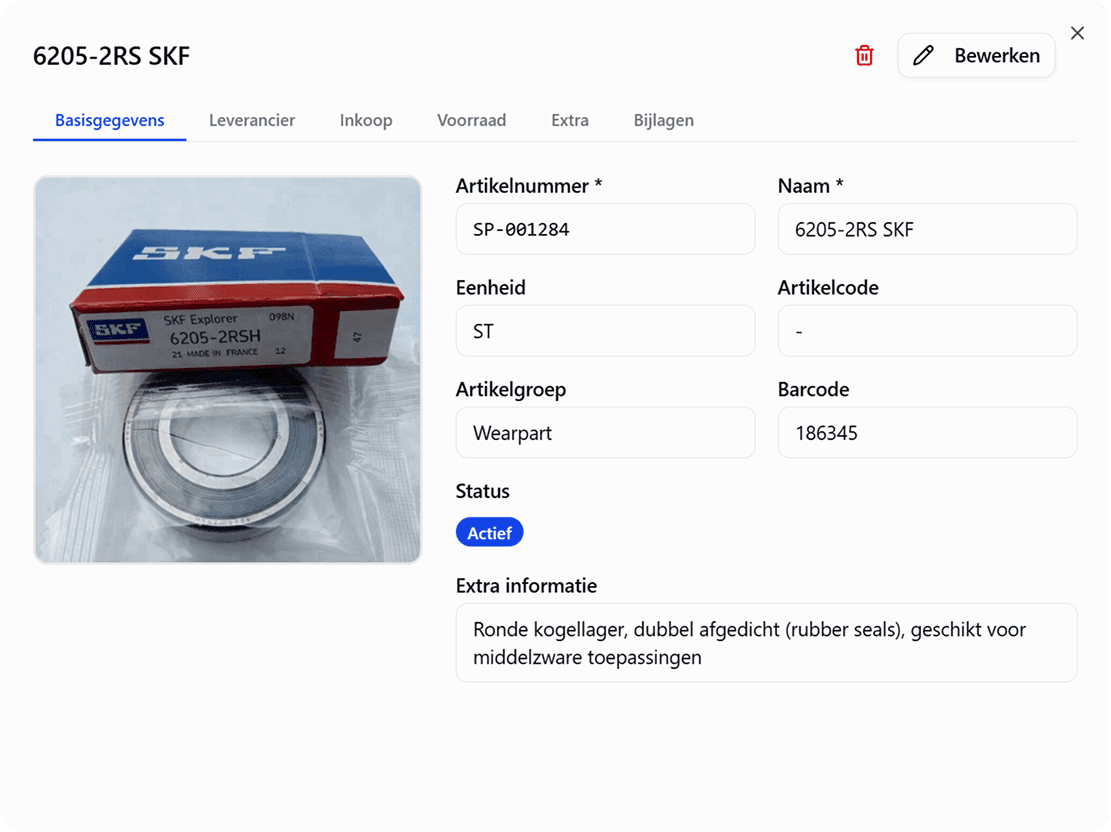
Item management with photos, barcodes and ABC classification; item numbers and barcodes can be assigned automatically. Stock per warehouse and location: physical, reserved and available.
Linked to work orders
A work order requests parts, the warehouse confirms what it can commit and issues it through a pick list. Every stock movement is traceable to the work order.
Counts & stock movements
Count plans per warehouse that spread all locations over a fixed cycle, counts you review before they are booked, and a full movement history.
Suppliers
Suppliers as shared master data, with contact details, lead times per item, preferred suppliers, minimum order value and attachments.
Parts map
Upload technical drawings and link items to clickable points — colour-coded by stock status.
AI photo search
Photograph a part and TimeQeeper finds the item: AI image recognition, text recognition (OCR) and barcodes work together — and it learns from your own catalogue.
From technical drawing to article number.
Pin every part on your own drawing. One click reveals the article number, its status and live stock — and each pin's colour tells you at a glance whether it's in stock.
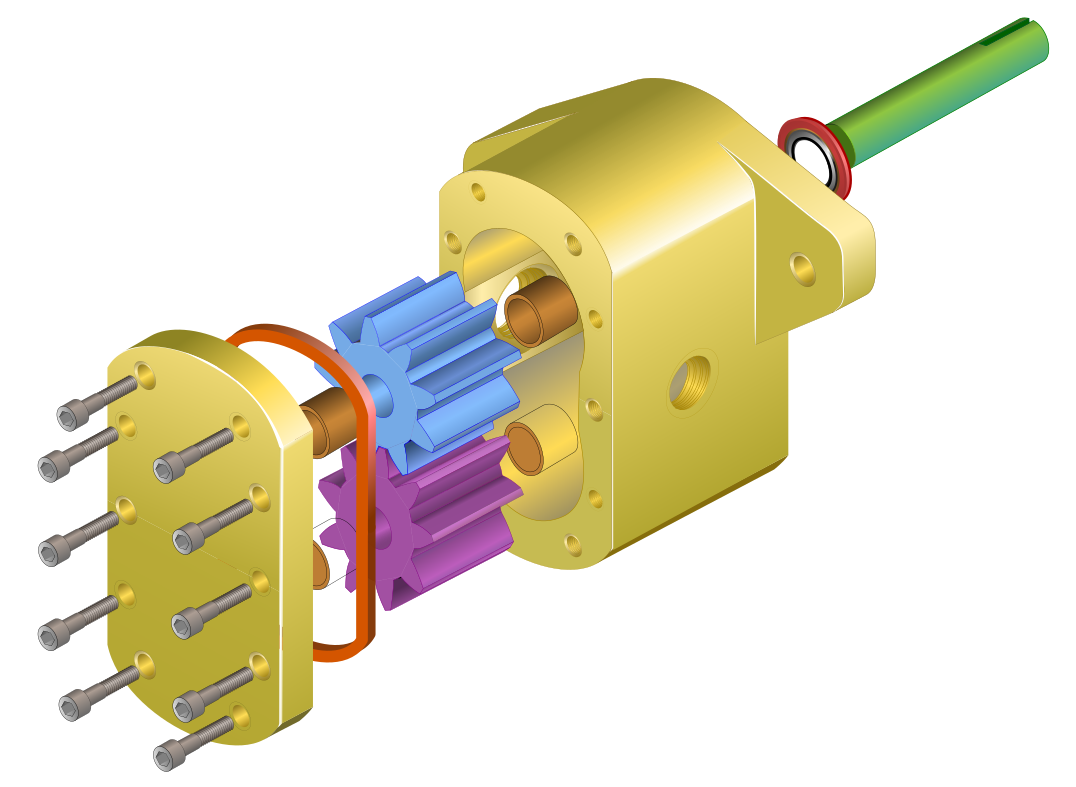
Parts (9)
- 1Pump housingART-PMP-10423 in stock
- 2Drive shaftART-PMP-10774 in stock
- 3Shaft sealART-PMP-108112 in stock
- 4Drive gearART-PMP-10511 · low
- 5Idler gearART-PMP-10520 · none
- 6BushingART-PMP-10688 in stock
- 7End coverART-PMP-10432 · low
- 8Housing seal (O-ring)ART-PMP-10856 in stock
- 9Housing bolt M8×40ART-PMP-109040 in stock
A part in your hand, but no item number.
Photograph the part. TimeQeeper turns that photo into a 768-dimensional fingerprint and compares it with the items in your own warehouse — so not only on text or barcode, but on what is actually in the picture.
Image
The shape and kind of part, even if you have never photographed this exact one before.
Text
Text recognition reads type and serial numbers off the part itself, even half-worn ones.
Barcode
If there is a readable code on it, that simply counts as an extra signal.
- Every result gets a label, not a percentage — a score is not a certainty
- Confirm or reject a match and recognition for your catalogue improves
- The model is multilingual, so Dutch descriptions match without translation
Your photo
Possibly the same item
- AQ00010734 available
Roller Guide Assembly
Strong matchTextCorrect itemNot this item - AQ0001126 available
Roller Guide Assembly HD
Possible match - AQ0002410 available
Roller guide with bearing block
Same type
The analysis runs on our own servers
Image and text recognition run inside our own environment. Your photo does not go to an external AI service.
Article labels
A0001284 · Bearing 6204-2RS no:6204-2RSH
Content
Code display
Free text
26/60Printing
Printer
Printer ready: Brother QL-810W
Saved format
Width (mm)
Height (mm)
Preview
Margin 3 mm
Click an element to move or resize it
From article to printed label, straight from TimeQeeper.
Open an article and turn it into a label straight away, or print the labels for a whole warehouse, a location, an article group or a range of article numbers in one go. You decide what goes on it: QR code and barcode, article name, warehouse location, your own logo and a free text line. In the preview you drag and scale each element until the label looks exactly right.
- QR code and barcode on the label; the QR code opens the article
- Drag and scale elements, on formats from 25 × 20 to 210 × 150 mm
- Save up to ten layouts of your own, with a preview as you hover over them
- Bulk printing: one label per article, or as many as there are in stock
- Straight to your label printer through a small print helper, or via your browser's print dialog
- New articles can get an article number and barcode automatically
The warehouse confirms what a work order gets.
A reservation for a work order starts as a request. The warehouse reviews it: confirm fully, partly or not at all, with a reason if less is confirmed than requested, and from another warehouse if needed. What is confirmed is committed: that stock is blocked for other work straight away.
- Visible per part on the work order: requested, confirmed and issued
- Reallocate commitments between work orders, with a reason and history
- Completing or cancelling the work order releases unused commitments
- An alert in the app when your reservation has been reviewed or reallocated
Pick lists
Pick per work order, per project or for separate reservations: one pick list per warehouse, or split per work order. Assign a picker and record the reason for any shortage per line. After marking the list as done, you book the issue: stock goes down and the reservations are consumed, in one go.
- Tick off or scan lines, with a PDF for those who prefer to pick on paper
- Statuses from draft to issued, with a history per pick list
Pick list · WO000322
Central warehouse · picker R. Bakker
- 3In progress
- 4
- 5
- A-03-211Picked
Shaft seal 45 mm
- A-03-422Picked
Bearing 6309-2RS
- B-11-110Shortage
Coupling spider
Not found at location
- C-02-61–Open
O-ring set NBR
Count plan Central warehouse 2026
Weekly · 52 periods · 12 months
Coverage: all 214 locations planned
- Week 40A-01 to A-06Completed
- Week 41B-01 to B-08Count in progress
- Week 42C-01 to C-05Planned
Count week 41 · Done
46 count lines · 2 differences · 1 found unexpectedly
Bearing 6309-2RS · found at B-04-1
What should happen to this article?
- Add location: B-04-1
- Change preferred location to B-04-1
- Book back to A-03-4
Count to plan, book after review.
A count plan spreads all locations of a warehouse evenly over a fixed cycle of one to sixty months, with daily, weekly or monthly periods. A count is reviewed first, before any stock correction is booked.
- Per period you see whether the count is planned, running or completed — and whether you are on schedule
- A count list to print, without the expected quantities on it
- Approve, reject with a reason, or complete with uncounted lines
- Articles found unexpectedly: first choose between adding the location, changing the preferred location or booking back
- Stock movements made after the count are taken into account when it is processed
From minimum stock to purchase — in one flow.
The replenishment page calculates your reorder needs in real time: everything below reorder point or minimum appears, sorted by urgency and grouped by supplier — including order advice up to your maximum. Select the lines and create a request right there.
- Min/max and reorder point per item, per warehouse
- Urgency at a glance: critical, low or reorder
- Automatic order advice and Excel export
- Create a request (RFQ) directly from the page
Replenishment needs
Lead time 5 daysTechnische Handel BV
(3)- 02 / 1010Critical
Bearing 6204-2RS
SP-001284
- 12 / 87Low
V-belt SPA 1250
SP-000871
- 34 / 129Reorder
Filter element 10µ
SP-002106
From order advice to purchase order.
With the Purchasing module you turn the order advice into a quotation request or a purchase order straight away, send it from TimeQeeper and book the delivery against the order, even when it arrives in several parts. Stock is updated immediately.
- 1Draft
- 2Sent
- 3Quote received
- 4Quote approved
- 5Ordered
- 6Partly received
- 7Received
Frequently asked questions about the warehouse and spare parts
Is the warehouse connected to work orders?
Yes, that is the starting point. A work order requests parts, the warehouse confirms what it can commit and you book the issue through a pick list. So you know not only that stock has gone, but what it went into.
How does searching for a part by photo work?
You photograph the part; image recognition, text recognition and barcodes work together to find the item in your own catalogue. Results are labelled as a strong match, possible match or same type, and recognition improves as you confirm matches.
How do we know what needs ordering?
The replenishment page continuously calculates what has dropped below its reorder point or minimum, sorted by urgency and grouped by supplier. With the Purchasing module the request runs from there all the way through to goods receipt, including partial deliveries.
How do we plan cycle counts?
With a count plan per warehouse. You choose a count cycle and a frequency, and TimeQeeper spreads all locations evenly over the periods. Per period you see whether the count is planned, running or completed, and for the whole plan whether you are on schedule.
What if a part cannot be found while picking?
Then you mark that line on the pick list as a shortage, with a reason such as not found, insufficient stock or wrong location. That way it is immediately clear what is missing and why.
Can we print labels without separate software?
Yes. Labels print straight from the article, or in bulk for a warehouse, location, article group or range of article numbers, through your browser's print dialog. To print directly to your label printer, you use a small print helper on your PC.
This warehouse fits in your pocket too.
With TimeQeeper Pocket you scan barcodes at the rack, book movements and counts on the spot, work through pick lists and find articles by number, name or photo.
Ready for more control over your maintenance?
Book a tailored demo. We'll show how TimeQeeper fits your assets, processes and team — and we'll get in touch quickly.